> ## Documentation Index
> Fetch the complete documentation index at: https://mcpjam-docs-coming-from-mcp-inspector.mintlify.site/llms.txt
> Use this file to discover all available pages before exploring further.
# MCPJam
> Test, debug, and evaluate MCP servers, MCP apps, and ChatGPT apps.
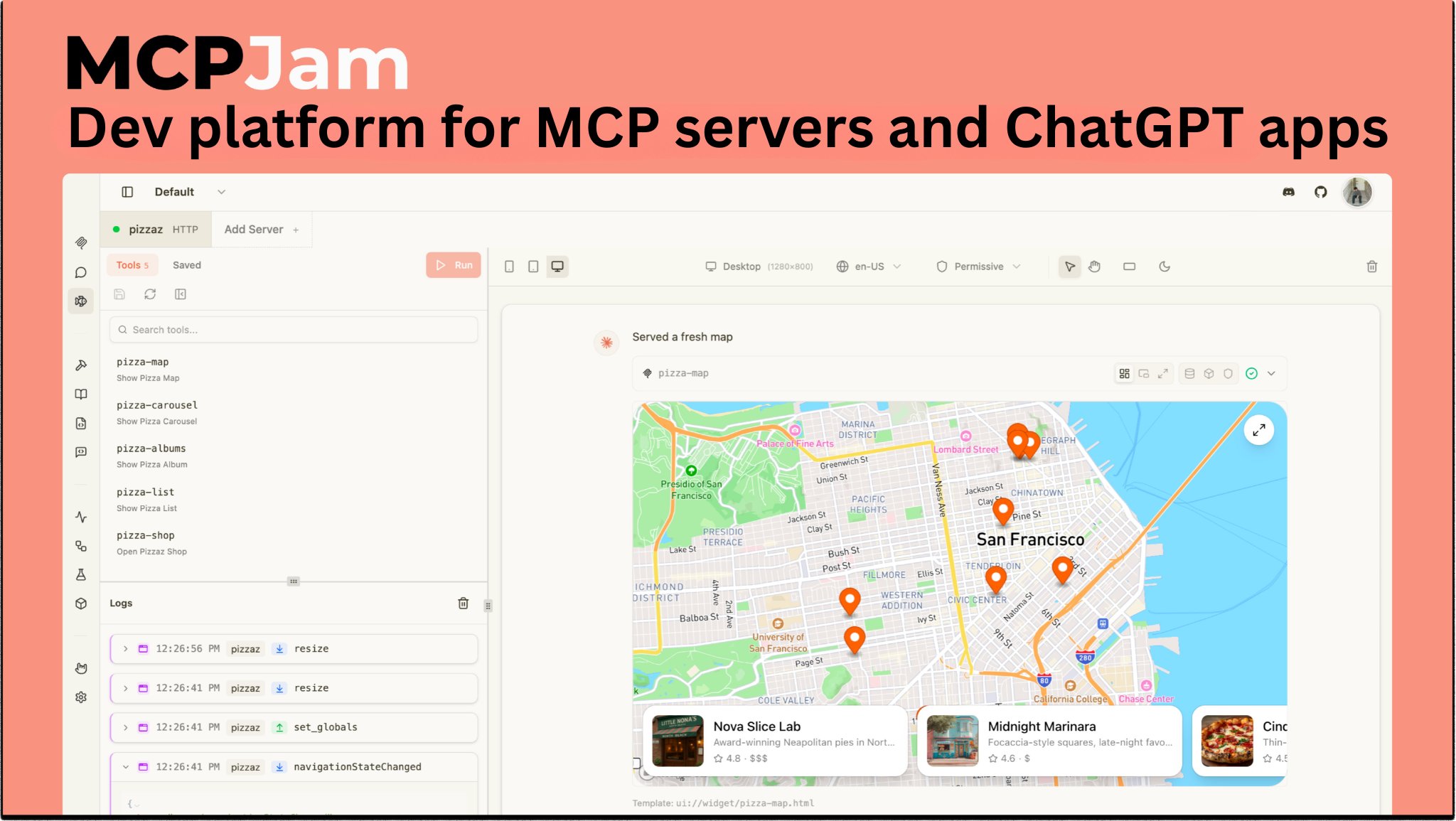
MCPJam is the development platform for **MCP servers, MCP apps, and ChatGPT apps**. Debug every JSON-RPC message and OAuth exchange, run evaluations across multiple LLMs, and track accuracy over time — so you catch regressions early and ship with confidence.
 ## Start in one command
Open [app.mcpjam.com](https://app.mcpjam.com). HTTPS servers, no install, shareable links.
```bash theme={null}
npx @mcpjam/inspector@latest
```
HTTP/S and local STDIO.
```bash theme={null}
npm i -g @mcpjam/cli
```
Probe, doctor, OAuth, evals — in CI or your shell.
## Four surfaces, one product
IDE-style workspace for MCP development. Chat with frontier models, invoke tools by hand, render widgets, compare hosts and models side by side.
Stateless tool for connectivity, OAuth, conformance, and tool execution. JUnit/JSON reporters built for CI.
`@mcpjam/sdk` — TypeScript toolkit for unit tests, e2e tests, and evals. Works inside Jest or Vitest.
Run MCPJam in the browser at [app.mcpjam.com](https://app.mcpjam.com). Share servers and sessions with your team.
## What you can build
Connect any HTTP, HTTPS, or STDIO server, watch every JSON-RPC message live in the Playground, and inspect tool input/output, widget state, and CSP activity per call.
[Open the Playground →](/inspector/playground) · [JSON-RPC logger →](/inspector/playground#json-rpc-logger)
The unified widget renderer handles both `_meta.ui.resourceUri` (MCP Apps) and `openai/outputTemplate` (ChatGPT Apps). The `window.openai` shim is always injected, so you can iterate without a real host.
[First MCP App →](/guides/first-mcp-app) · [First ChatGPT App in React →](/guides/first-chatgpt-app-react)
Step through every stage of the MCP authorization flow against protocol versions 03-26, 06-18, and 11-25, with DCR, pre-registration, and CIMD coverage.
[Guided OAuth →](/inspector/guided-oauth) · [CLI OAuth conformance →](/cli/oauth-conformance)
Author cases with expected tool calls, optional expected outputs, and deterministic checks. Run across Claude, GPT, Gemini, and your own providers — or move the same suite into Jest/Vitest with `@mcpjam/sdk`.
[Evaluate in Inspector →](/inspector/evals) · [Run evals from the SDK →](/sdk/concepts/running-evals) · [CI integration →](/cli/ci)
Launch the Inspector with a prefilled server URL, bearer token, and starting tab via CLI flags — wire it into your dev script or a framework integration.
[Launch from code →](/inspector/launch-from-code)
In the hosted app, share a server URL the same way you'd share a Google Doc. Teammates connect with one click and pick up where you left off.
[Hosted overview →](/hosted/overview)
## Capabilities at a glance
| Capability | Description |
| -------------------- | ------------------------------------------------------------------------------------------------------------------------------------------------------------------------------------------------------------------------------------------------------------- |
| Playground | IDE-style workspace combining chat, manual tool calls, widget rendering, Chat/Trace/Raw views, and multi-model and multi-host compare. OpenAI Apps SDK and MCP App UIs, text tools, Chrome DevTools-style widget emulator. [Read more](/inspector/playground) |
| OAuth Debugger | Guided MCP OAuth conformance checks: protocol versions 03-26, 06-18, 11-25; DCR, client pre-registration, CIMD. [Read more](/inspector/guided-oauth) |
| MCP Server Debugging | Manually run tools, resources, templates, and elicitation; full JSON-RPC logs. |
| Skills | Skills in the Playground; local filesystem only. [Read more](/inspector/skills) |
| Projects | Shared server groups with real-time team sync. [Read more](/inspector/projects) |
| Evals | Test cases with expected tool calls, run across LLMs, metrics. [Read more](/inspector/evals) |
| CLI | Run MCPJam checks, probes, and evals from the terminal. Perfect for local dev loops and CI. [Read more](/cli/overview) |
| SDK | Programmatic access to MCPJam for custom tooling, scripting, and integrations. [Read more](/sdk) |
| CI/CD | Run MCPJam checks and evals in GitHub Actions and other CI systems to gate PRs on regressions. [Read more](/cli/ci) |
## Get help
Ask the team and the community.
File an issue or open a PR.
What shipped, and when.
## Start in one command
Open [app.mcpjam.com](https://app.mcpjam.com). HTTPS servers, no install, shareable links.
```bash theme={null}
npx @mcpjam/inspector@latest
```
HTTP/S and local STDIO.
```bash theme={null}
npm i -g @mcpjam/cli
```
Probe, doctor, OAuth, evals — in CI or your shell.
## Four surfaces, one product
IDE-style workspace for MCP development. Chat with frontier models, invoke tools by hand, render widgets, compare hosts and models side by side.
Stateless tool for connectivity, OAuth, conformance, and tool execution. JUnit/JSON reporters built for CI.
`@mcpjam/sdk` — TypeScript toolkit for unit tests, e2e tests, and evals. Works inside Jest or Vitest.
Run MCPJam in the browser at [app.mcpjam.com](https://app.mcpjam.com). Share servers and sessions with your team.
## What you can build
Connect any HTTP, HTTPS, or STDIO server, watch every JSON-RPC message live in the Playground, and inspect tool input/output, widget state, and CSP activity per call.
[Open the Playground →](/inspector/playground) · [JSON-RPC logger →](/inspector/playground#json-rpc-logger)
The unified widget renderer handles both `_meta.ui.resourceUri` (MCP Apps) and `openai/outputTemplate` (ChatGPT Apps). The `window.openai` shim is always injected, so you can iterate without a real host.
[First MCP App →](/guides/first-mcp-app) · [First ChatGPT App in React →](/guides/first-chatgpt-app-react)
Step through every stage of the MCP authorization flow against protocol versions 03-26, 06-18, and 11-25, with DCR, pre-registration, and CIMD coverage.
[Guided OAuth →](/inspector/guided-oauth) · [CLI OAuth conformance →](/cli/oauth-conformance)
Author cases with expected tool calls, optional expected outputs, and deterministic checks. Run across Claude, GPT, Gemini, and your own providers — or move the same suite into Jest/Vitest with `@mcpjam/sdk`.
[Evaluate in Inspector →](/inspector/evals) · [Run evals from the SDK →](/sdk/concepts/running-evals) · [CI integration →](/cli/ci)
Launch the Inspector with a prefilled server URL, bearer token, and starting tab via CLI flags — wire it into your dev script or a framework integration.
[Launch from code →](/inspector/launch-from-code)
In the hosted app, share a server URL the same way you'd share a Google Doc. Teammates connect with one click and pick up where you left off.
[Hosted overview →](/hosted/overview)
## Capabilities at a glance
| Capability | Description |
| -------------------- | ------------------------------------------------------------------------------------------------------------------------------------------------------------------------------------------------------------------------------------------------------------- |
| Playground | IDE-style workspace combining chat, manual tool calls, widget rendering, Chat/Trace/Raw views, and multi-model and multi-host compare. OpenAI Apps SDK and MCP App UIs, text tools, Chrome DevTools-style widget emulator. [Read more](/inspector/playground) |
| OAuth Debugger | Guided MCP OAuth conformance checks: protocol versions 03-26, 06-18, 11-25; DCR, client pre-registration, CIMD. [Read more](/inspector/guided-oauth) |
| MCP Server Debugging | Manually run tools, resources, templates, and elicitation; full JSON-RPC logs. |
| Skills | Skills in the Playground; local filesystem only. [Read more](/inspector/skills) |
| Projects | Shared server groups with real-time team sync. [Read more](/inspector/projects) |
| Evals | Test cases with expected tool calls, run across LLMs, metrics. [Read more](/inspector/evals) |
| CLI | Run MCPJam checks, probes, and evals from the terminal. Perfect for local dev loops and CI. [Read more](/cli/overview) |
| SDK | Programmatic access to MCPJam for custom tooling, scripting, and integrations. [Read more](/sdk) |
| CI/CD | Run MCPJam checks and evals in GitHub Actions and other CI systems to gate PRs on regressions. [Read more](/cli/ci) |
## Get help
Ask the team and the community.
File an issue or open a PR.
What shipped, and when.